Security that protects privilege and the deadline.
We secure privileged data, harden identity, and govern AI for firms and legal teams, so client confidences hold up to scrutiny and downtime doesn’t cost you a deadline.
Document security · eDiscovery-ready · ethical-wall controls
The problems we take off your plate.
Protect privileged data and matter deadlines with security that holds up to scrutiny and Copilot that drafts without leaking.
Privilege & confidentiality
A single leaked document or compromised mailbox can waive privilege and damage client trust for good.
Deadlines do not wait
Filing and discovery deadlines turn any downtime into a liability.
Ethical walls
Matter and client separation has to be enforced in the tools, not just written in a policy.
AI that drafts without leaking
Copilot can speed drafting, but only if it cannot surface the wrong client's files.
Capabilities engineered for your reality.
Identity & document security
Multi-factor authentication (MFA) and least-privilege access on the document stores where privileged work lives.
Ethical-wall controls
Access boundaries between matters and clients, enforced inside Microsoft 365 itself.
eDiscovery-ready
Retention, legal holds, and search configured so discovery runs as a routine process.
Governed Copilot drafting
Data access reviewed before rollout, so Copilot speeds drafting without surfacing the wrong client’s files.
One workflow, run in the real product.
This is the exact scenario a legal organization brought us — played back on authentic Microsoft screens.
Teams + Copilot product tour
Catch up in Teams Recap, then create the follow-through
A law-firm partner finishes a 42-minute client meeting with decisions buried across the transcript, chat, and shared files.
Stage 1 of 4
Stage 1 of 4: Open the Recap tab. The walkthrough starts in the meeting chat. The user opens Recap and confirms a recording or transcript is available.
Stage 1 — Open the Recap tab: The walkthrough starts in the meeting chat. The user opens Recap and confirms a recording or transcript is available.
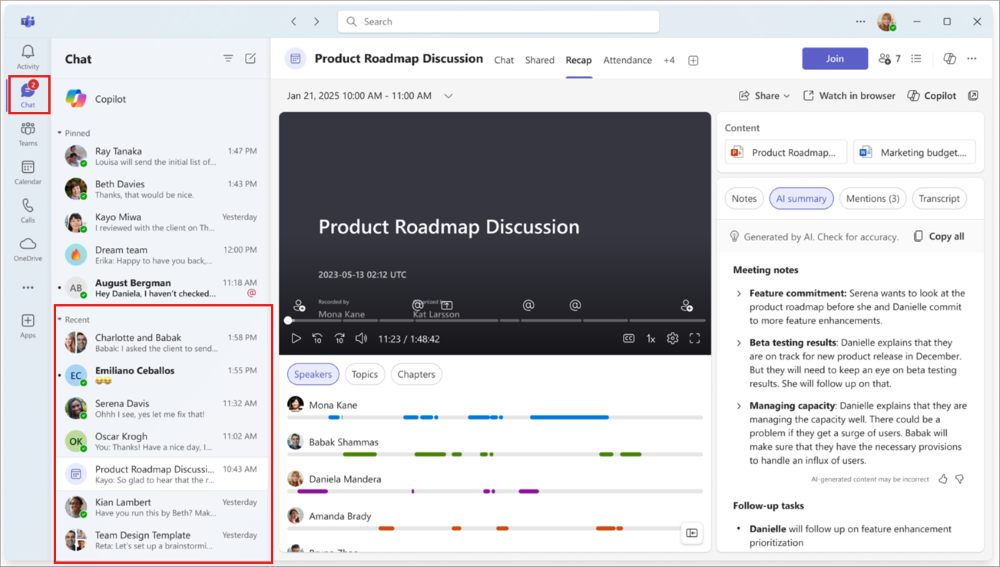
No transcript, no trustworthy recap. This one check decides whether AI can help with this meeting at all.
What AI did: Teams had already produced the transcript and recording during the meeting; nothing new was generated yet.
The meeting becomes accountable work
The partner reviews a sourced recap, edits the email, approves the tasks, and keeps the record in the firm’s existing Microsoft 365 workspace.
What your business gets out of this
Click any item for the plain-English version — what it means, what it looks like in practice, why it matters, and the question worth asking your team.
References: Teams meeting productivity module · Manage meetings and collaboration
Evidence, not assurances.
- Attorney-client privilegeControls engineered to keep privileged material contained.
- Retention & legal holdsPolicies and holds configured and documented in Microsoft 365.
- Confidentiality dutiesSecurity aligned to your professional obligations to clients.
- Conflicts / ethical wallsMatter separation enforced in the tools your teams use daily.
What you get
- Confidence that privileged data stays contained.
- Deadlines protected by resilient, monitored systems.
- AI drafting help without confidentiality risk.