IT that keeps clinicians with patients, not tickets.
We run the security, uptime, and Microsoft 365 + Copilot program for clinics, practices, and health organizations, so protected health information stays protected and care isn’t held up by technology.
HIPAA-aware controls · EHR-adjacent support · telehealth enablement
The problems we take off your plate.
Keep clinicians focused on patients while we keep PHI (protected health information) protected, systems uptime high, and telehealth running without friction.
Protecting PHI everywhere
Patient data moves across email, electronic health record (EHR)-adjacent apps, devices, and the cloud. One misconfigured share or phished login can become a reportable breach.
Downtime reaches patients
When systems are down, scheduling, charting, and telehealth stop. Recovery has to be fast, and it has to be tested.
Audit & HIPAA pressure
You need evidence your safeguards (access control, encryption, training) actually work, without standing up a full-time security team.
Copilot without leaks
Staff want AI help, but Copilot surfaces whatever a user can already see. Governance has to come first.
Capabilities engineered for your reality.
Zero Trust for PHI
Enforced multi-factor authentication (MFA), least-privilege access, and device encryption so a lost laptop or stolen password is not a breach.
24/7 threat monitoring
Automated Microsoft Defender detection and response, watching identity, email, and endpoints around the clock.
Resilient backup & continuity
Tested, isolated backups of Microsoft 365 and critical systems, with a recovery plan you can execute under pressure.
Copilot, governed
Data-access review and guardrails before rollout, so clinicians get AI help without exposing records.
One workflow, run in the real product.
This is the exact scenario a healthcare organization brought us — played back on authentic Microsoft screens.
Microsoft Purview DLP product tour
Build and simulate a Purview DLP policy before enforcement
A practice manager asks Copilot to summarize a spreadsheet labeled Highly Confidential that contains patient and insurance identifiers.
Stage 1 of 4
Stage 1 of 4: Choose intent and scope. The administrator starts at Data loss prevention → Policies, creates a policy, and scopes it to the Microsoft 365 locations that carry regulated work.
Stage 1 — Choose intent and scope: The administrator starts at Data loss prevention → Policies, creates a policy, and scopes it to the Microsoft 365 locations that carry regulated work.
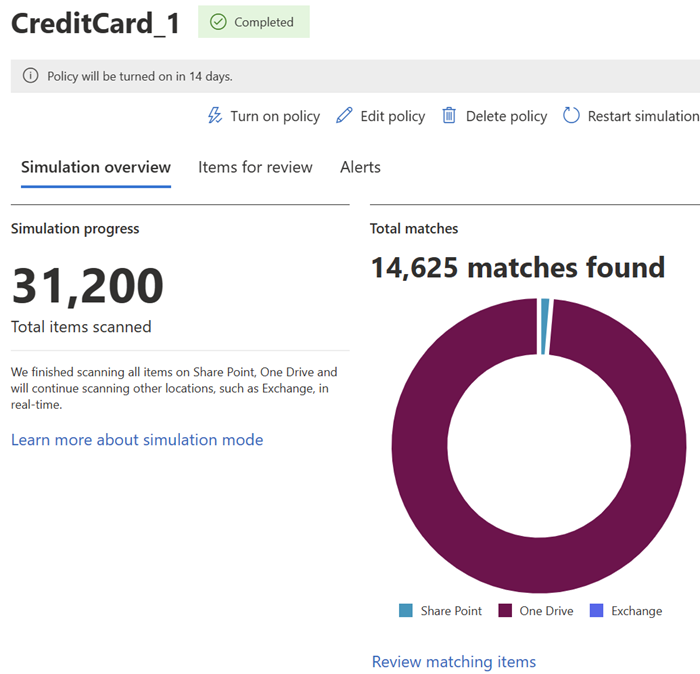
The policy is scoped to where patient data actually lives, so protection follows the data.
What AI did: Purview’s classifiers had already inventoried where sensitive information types appear across these locations, so scoping starts from evidence.
AI stays useful without outrunning policy
The manager can still use Copilot for approved work, but the sensitive file is not processed and the organization retains an auditable record.
What your business gets out of this
Click any item for the plain-English version — what it means, what it looks like in practice, why it matters, and the question worth asking your team.
References: Purview DLP simulation mode · Protect a Copilot environment with Purview
Evidence, not assurances.
- HIPAA Security RuleControls mapped to the required safeguards and documented as evidence.
- Access & audit trailsWho-saw-what logging across sensitive systems.
- EncryptionData protected at rest and in transit.
- Workforce trainingOngoing phishing and security-awareness practice.
What you get
- Fewer interruptions to care from outages or incidents.
- A defensible answer when an auditor or a patient asks how their data is protected.
- Safe Copilot adoption that gives clinicians time back.